


I cut the cord 3 years ago and I gotta say, not paying my monthly Cable bill any longer is something I am all the way on board with . But here’s the part that really got me thinking: I still wanted to be able to watch free TV channels without jumping through hoops or signing up for yet another bloody subscription service for me.
After trying loads of different things I finally came across something that actually delivers : using an IPTV playlist I found on GitHub with VLC media player. It’s not perfect by any means but for a freebie, it’s my go to solution whenever I need to get my live channel fixed.
Before we dive into the ‘how to‘ bit, i gotta give you a few heads up type things that nobody really seems to make clear. This is a guide that explains how to watch free TV channels online using mobile phones, laptops and desktops with publically available IPTV playlists and VLC media player – no need to pay for cable or any subscriptions.
Legal and Security Warning: Read This First
Okay so I’m not a lawyer but this is seriously worth looking at. The thing is, a ton of IPTV streams floating around the internet are basically breaking copyright laws. Just because you can get to a stream doesn’t mean you’re under the radar, legally-speaking, when you watch it. In 2025 because high-speed internet makes streaming easier than ever and the temptation to just get everything for free is right there, but you’ve got to know the risks.
Here’s what you should know:
- Most unauthorized IPTV streams are illegal in many countries. Broadcasting licensed content without permission violates copyright laws, and yes, watching those streams can potentially get you in legal trouble depending on where you live.
- Check your local laws about streaming before you do anything. Some places are stricter than others.
- Only use official, licensed, or public domain streams. There are legitimate free channels out there—news networks, public broadcasting, educational content. Stick to those.
- Security risks are real and often ignored. Untrusted IPTV sources can contain malware, tracking code, or worse. I’ve heard stories of people getting their devices compromised from sketchy playlist files.
- Some people use a VPN for general online privacy when streaming, but it’s important to understand that a VPN does not make illegal streams legal or remove copyright obligations.
- Consider legitimate free alternatives first: Pluto TV, Tubi, Xumo, and even YouTube have tons of free content with proper licensing. They include ads, but they’re legal and safe.
I’m sharing this method because it can be used legitimately for public broadcasts and legal streams. But please, be smart about what you access. Now, with that out of the way, let’s talk about how this actually works.
Ultimately, you’re responsible for what you choose to watch, so it’s worth sticking to official, public, or properly licensed channels whenever possible.
What You’re Actually Getting Into With Free IPTV Playlists
When you watch free TV channels using this method, you’re essentially accessing streaming links that someone has compiled into a playlist. The iptv-org project on GitHub is where you’ll find a community maintained list of publicly available streaming links. It’s not a streaming service itself, it just organizes links that already exist all over the web. Thousands of channels from all around the world are included. The thing is though some work perfectly some will just keep buffering, and a few just stop working.
The main thing is unpredictability. One day you might find yourself watching a crisp-as-a-button news channel, the next it will be removed or vanished. Channels come and go, urls get updated, and the quality is all over the place depending on where you’re getting the stream from. I’ve spent some pretty dismal evenings clicking channels that just don’t work any more, especially the sports ones, which can be a real bummer.
But when does it actually work? and to be honest, it’s pretty darn good. I can get all sorts of international news, documentaries, music stations, and random stuff I would never in a million years find on regular cable.
Step 1: Finding the IPTV Playlist
Firstly you need to access the iptv-org repository on GitHub. You can either open your browser and search for “iptv-org github or directly visit to github.com/iptv-org. This project is pretty cool as they’ve got all the channels organized into playlist files by country, category & language.
What really surprised me when I first divided into this was just how massive the whole thing is. We’re talking about channels from every single continent here. The main playlist file is massive probably too big for most people to use effectively. The main playlist file is basically too big for most people to use. I reckon you’d do better to start with the country-specific or category-specific playlists instead.
Look for files ending in .m3u or .m3u8 those are the playlist formats that your media player will actually be able to read. You’re going to see options like ” channels by country” , ” channels by category” or ” channels by language ” browse through and pick what fits your viewing habits best.
Now things get a little more technical. You can download the playlist file or copy the absolute URL link from the now playing page (link is at the top right). Personally I recommend copying the absolute URL link because it will always point to the latest updated playlist file without any further need of downloading.
To get the raw url, click on the playlist file you fancy, then click the “Raw” button which is usually near the top right somewhere. That gives you a direct link to that file copy that entire url into your clipboard for later use. You’re going to need it.
Step 2: Installing VLC Media Player
If you don’t already have VLC, you need to download it from there official website. It’s free, open-source, and works on every operating system outthere: Windows, Mac, Linux, Android, and iOS. Go to videolan.org and download the supported version for your operating system.
Installation is straightforward download the installer, run it, click through the setup wizard. I’ve never had issues installing VLC on any platform. It just works, which is refreshing in a world where software often makes you jump through authentication hoops.
For mobile devices, search for “VLC” in your app store for IOS andfFor Android search in playstore. The official version is from VideoLAN. Install it like any other app.
One thing I appreciate about VLC is that it doesn’t come with bloatware or try to upsell you on premium features. It’s genuinely free software that does what it promises.
Step 3: Loading the Playlist into VLC
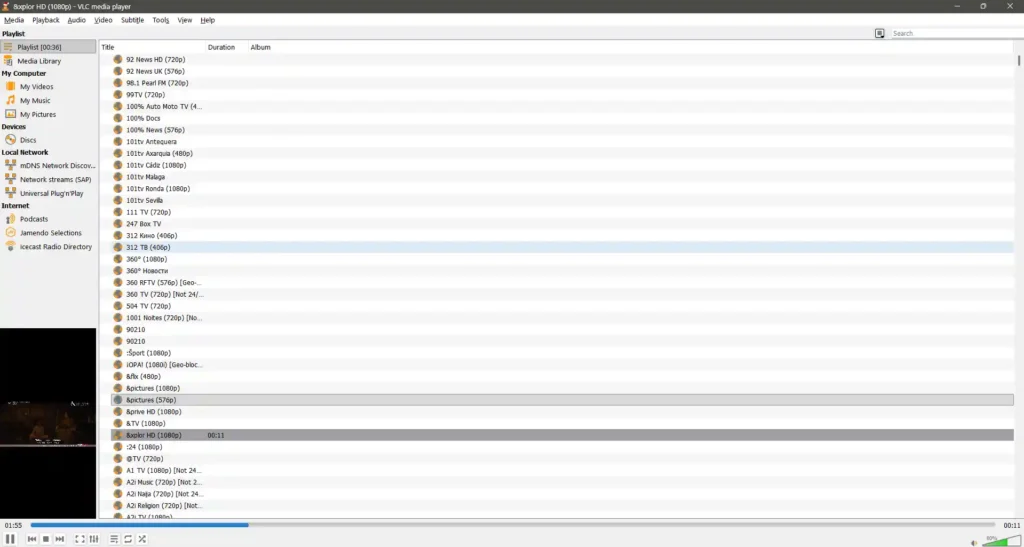
This is where it all clicks into place. Firstly Open up VLC and your system is not going to matter too much the general idea’s the same no matter what you’re working on.
On Windows or Mac:
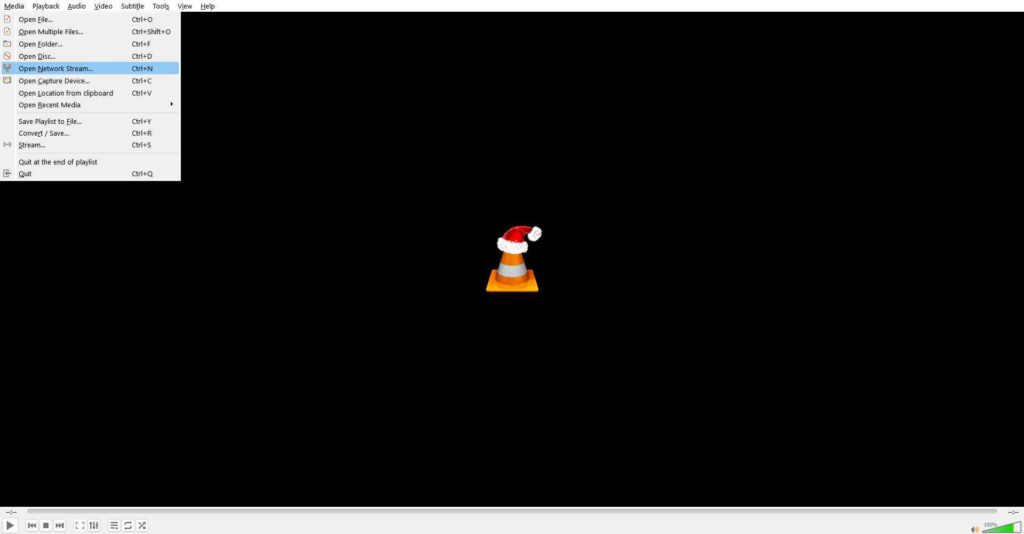
Then Go to Media and Open Network Stream (or on a Mac, File > Open Network).
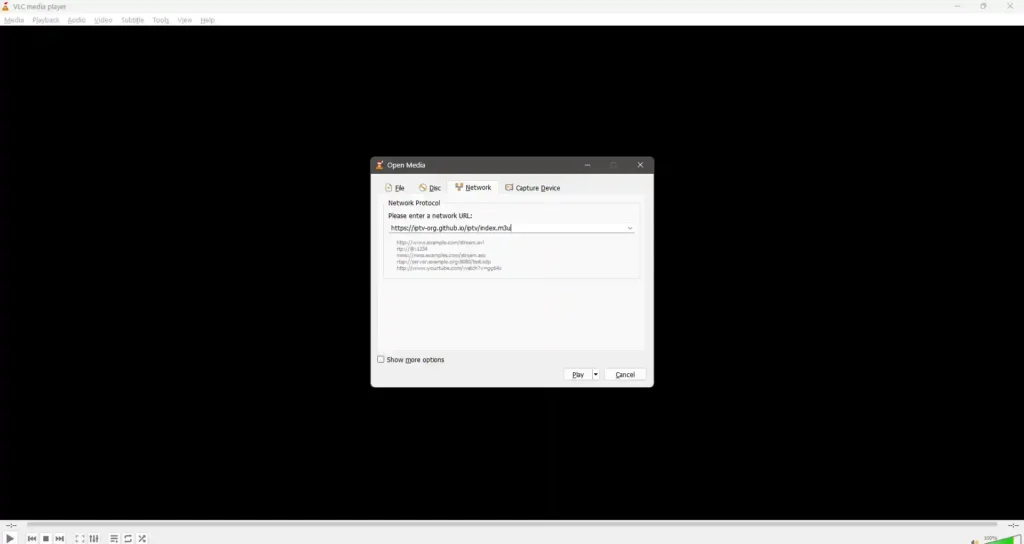
You’ll see a dialogue box pop up asking for the network URL paste in that raw GitHub URL you copied off in the previous step.
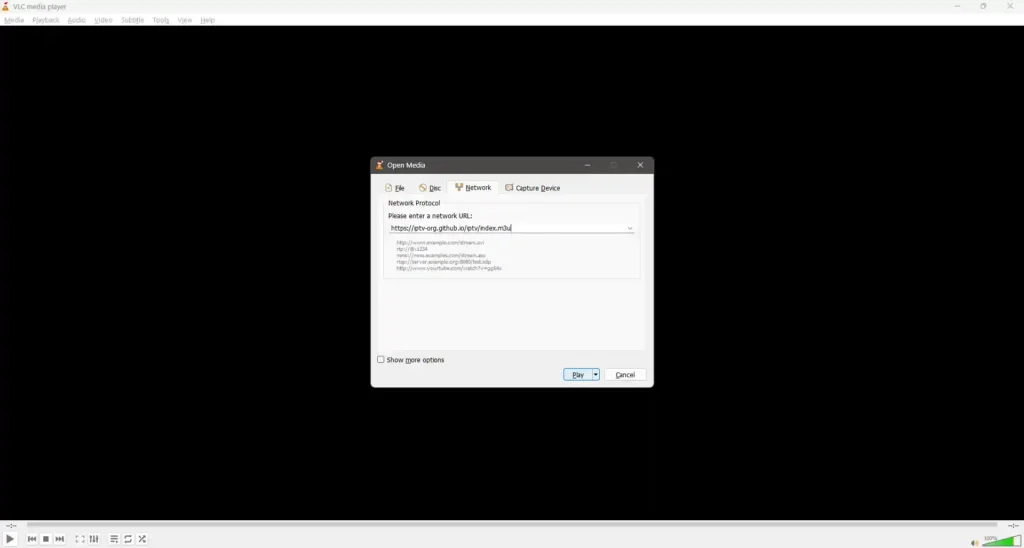
Click the play or open button and VLC will get to work processing the playlist and that can take a good minute or more if the file is really huge.
When it loads up, you should see your playlist appear in VLCs playlist window if not, just click on Toggle Playlist Button.
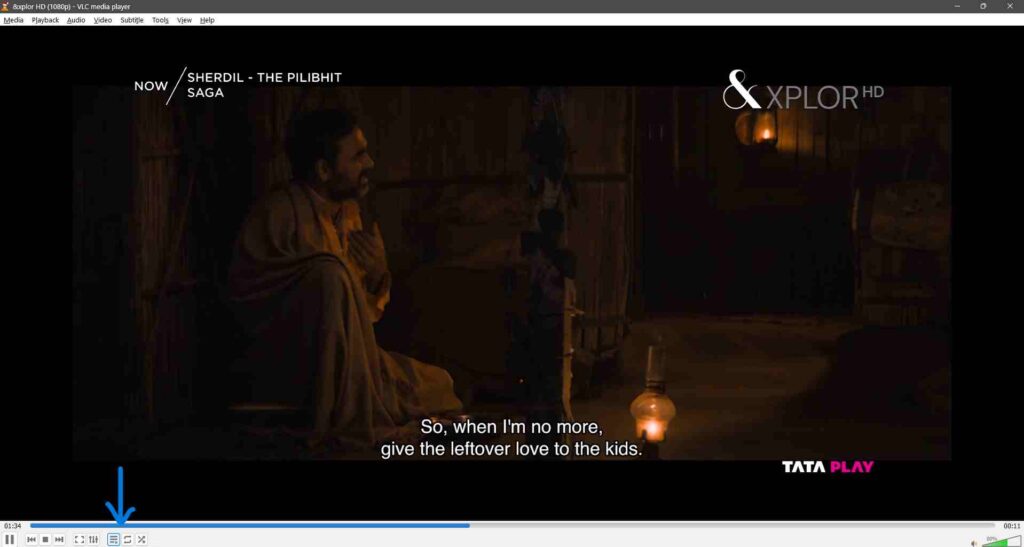
Now you’re looking at what can be a literally huge list of channels maybe hundreds, maybe thousands.
On mobile (Android/iOS):
Open VLC and have a look for the menu icon that’s usually three little lines side by side. Then you’re looking for “Network Stream” or “Stream”. Then Click on New Stream and Enter the playlist URL in there and click open.
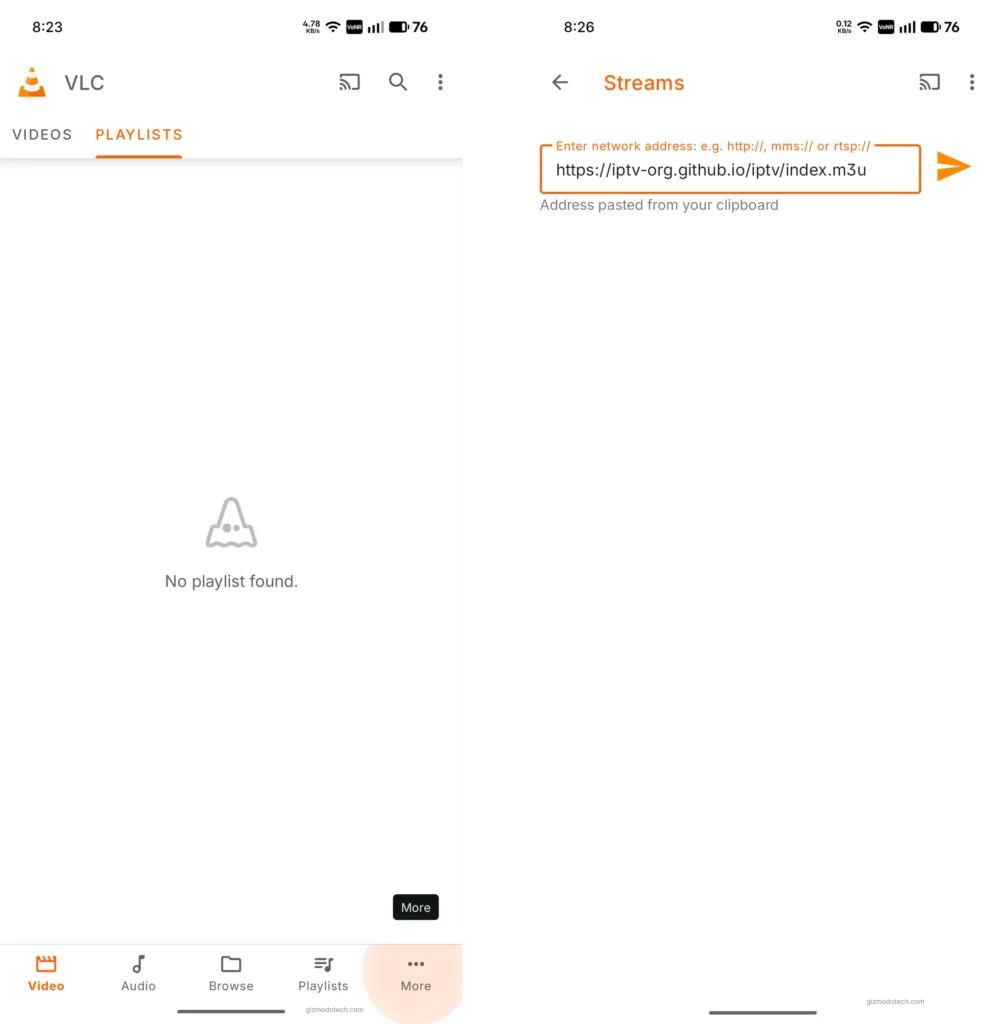
Wait for some time the stream will open. My first time doing this it just took about thirty seconds, and I thought for sure I’d messed something up. But then suddenly the stream started. Just be patient and for the Playlist just click on the right top button.
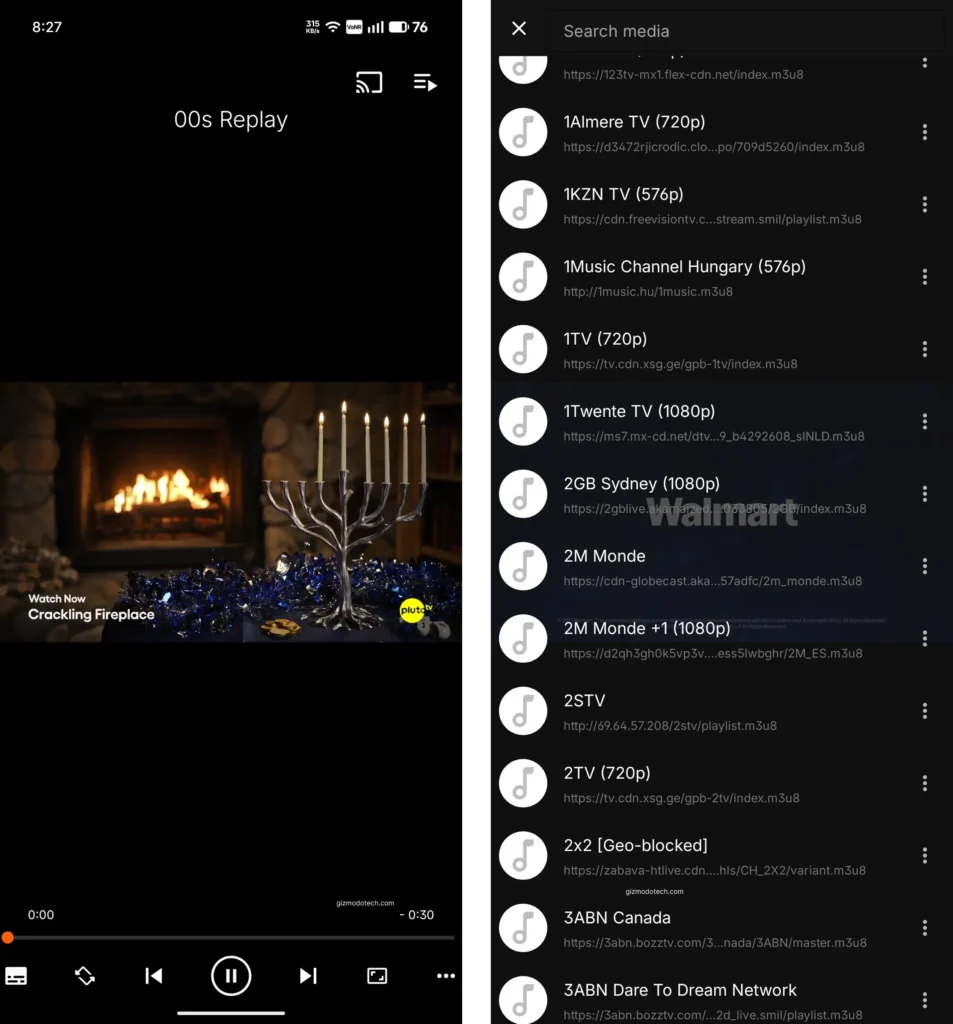
What to Expect When You Start Watching
Instead of attempting to replace a paid streaming service, this thing works best if you’re just trying to watch some free live TV online, particularly news and public broadcasts. Click on a channel from the list and sometimes just sometimes it plays right away with decent video quality. Other times you get a black screen staring back at you, and at times it just buffers and buffers before finally deciding whether it’s going to play or not.
This is pretty much the reality of trying to stream live TV for free using community-maintained playlists. Stream quality can go from surprisingly good HD to downright unwatchable stuttering mess. And honestly, it all depends on a whole bunch of things: the source of the stream, the speed of your internet, the server hosting the stream and probably even the stars aligning the right way.
I’ve found news channels to be fairly reliable. A lot of news orgs stream their content online anyway, so their links tend to stay active and actually work most of the time. Entertainment channels are a bit of a gamble, really. And sports streams are usually the worst – those ones get targeted pretty aggressively for copyright enforcement, so they tend to disappear into thin air.
Geographic restrictions also come into play with some of these streams. A channel that runs well in one nation may be blocked in another. VPNs can be helpful in situations like this, but using one to avoid geo-restrictions and view information you’re not even authorized to see puts you in a bit of a legal insecurity.
Troubleshooting Common Problems
Channels won’t play: This is probably the most common problem you’ll run into. The stream might be offline, the URL might be outdated or just plain wrong or there could be something going on with your network. So try swapping out to a different channel and see what happens. If nothing works, it’s possible the playlist itself has a problem in it trying loading up a different playlist from the repository.
Constant buffering: There are a couple of things that could be going on here. Either your internet connection is just not up to the task or the stream source is overloaded with requests. One thing that often helps is to switch down to a lower quality stream; these ones generally buffer less than the high def versions. I’ve had better luck with international news channels than trying to stream the big networks.
Format errors: Every now and then VLC will complain that it can’t read a particular stream format. This is usually easily fixed by updating VLC to the latest version – the newer ones tend to support more streaming protocols. If that doesn’t sort things out, it may just be that the stream itself is using an unsupported format.
Playlist won’t load: Always make sure you’re using the raw URL which should end in .m3u or .m3u8 and not just the url of the GitHub page. If that doesn’t work, it’s possible the playlist is just too big. We’re talking thousands of channels here and are timing out while it’s loading. Try switching to a smaller, category specific playlist instead.
No audio or video is out of sync: This is one of those annoying problems that can seem really frustrating at first, but usually turns out to be pretty simple. First try stopping the stream and then restarting it. If it persists, it’s probably a problem with the source stream and you might need to just move on to a different channel.
I had one of those really frustrating evenings a while back where I wasted twenty minutes trying different channels before I finally twigged that my internet connection had slowed to a crawl because everyone else in the building was streaming at the same time. Sometimes the problem isn’t with the stream, it’s your own network.
Alternative Players If VLC Doesn’t Work
I highly recommend VLC media player but there are plenty of other options out there too. Kodi is super popular for watching IPTV , but let’s be honest it does come with a bit of a learning curve. One thing that’s nice about it though, is you can install IPTV addons which make channel management a whole lot simpler than using the playlist interface on VLC.
There are also some really good specialized IPTV player apps out there for mobile devices, like IPTV Smarters and GSE Smart IPTV. These are specifically designed for watching IPTV playlists on smaller screens and they often have a more user-friendly interface than VLC. They also make it way easier to manage your channels, add them to favourites and keep up with what’s on with the EPG (electronic programme guide.
Perfect Player is another Android option that some people swear by. I’ve tried it out briefly though and to be honest the interface just didn’t click with me. YMMV though maybe it’ll be the perfect fit for you.
My Honest Take After Regular Use
I primarily use this set up to watch international news channels and the odd documentary and for that, it’s alright. I’m not trying to replace Netflix or catch up on the latest shows, the simple fact is that the free IPTV can’t get you those legitimate options anyway.
The variety of channels genuinely blew me away when I first started browsing through the playlists though. I’ve discovered news sources from countries I barely knew existed, stumbled onto interesting documentaries about niche topics, and found music video channels that are perfect for background ambiance while working.
There are some limitations also. You never really know what stream quality is going to be like. Channels just vanish into thin air sometimes without any warning. There’s no record option, no pause button that actually works properly with live streams. You’re entirely at the mercy of whoever is hosting the stream at any given time.
Also, navigating through massive channel lists in VLC is tedious. There’s no proper channel guide with descriptions or schedules. You click channels basically at random hoping to find something interesting. It’s the opposite of modern streaming services with their sophisticated recommendation algorithms.
To be honest though my frustration levels aren’t too high because I’m mainly accessing public broadcast content that’s freely available anyway. I’m basically just using this as a neat way to aggregate all that content in one spot, rather than trying to pull off some dodgy pirate operation for premium stuff.
Watch TV Online Without Cable: Is It Worth It?
It entirely depends on what you want and your tolerance for technical friction. If you need straightforward access to specific channels or shows just go for a paid streaming service, they are worth the cash.
If you are interested in watching international content, want to keep an eye on what’s going on in the news, or enjoy tinkering with tech, then this might be worth checking out. The guys over at iptv-org put together a nice collection of free IPTV playlists, one of the more organised ones out there.
Just remember though streaming television for free is not the same as everything is free legally. There’s a difference between watching public broadcasts and breaking the copyright laws; the former is fine; the latter can get you into trouble.
Still, this setup works for me a couple of times a week, usually when I’m keeping an eye on the international news or wondering what’s on the box in other parts of the world. It’s a nice little fill in that the regular services just don’t provide.
What’s Your Experience?
Have you ever used IPTV playlists to view free TV channels? I would like to know if it is working for you or not. Do you know of any other ways or tips for getting reliable, better-quality streams? I’d love to know about any sources you’ve found that I haven’t listed. Drop comments in the comment box.
What troubleshooting techniques have you discovered that I forgot to mention in the article? There are situations when the community knows of solutions that are not officially documented.

No comments yet. Be the first to share your thoughts!