
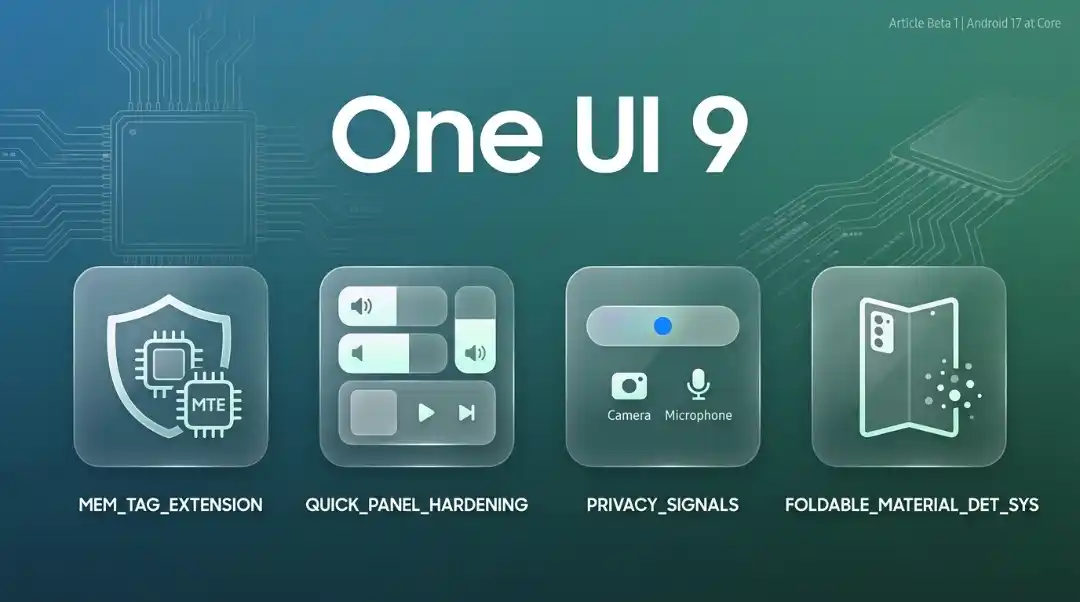

One UI 8.5 was the visual overhaul. One UI 9 is the layer underneath it — security hardening, privacy signals, smarter panels, and a handful of genuinely useful additions that most roundups either misunderstand or bury.
Beta 1 dropped May 12, 2026. It’s a 3.6 GB update for the Galaxy S26 series, carrying the May 2026 security patch and Android 17 at its core. Samsung officially listed 12 changes. Several leaked features — Tap to Share, glassier UI effects, Memory Tagging Extension — are not in Beta 1 but are confirmed in pre-release builds. Everything below is labelled accordingly.
One UI 9 Release Date and Beta Timeline
| Milestone | Date |
|---|---|
| Beta 1 live (US, UK, Germany, South Korea) | May 13, 2026 |
| Beta 1 expansion (India, Poland) | May 26, 2026 |
| Stable release + Galaxy Z Fold 8 / Z Flip 8 launch | July 2026 (likely July 22, London) |
| Rollout to S25/S24 and other flagships | August–September 2026 |
To join the beta: open Samsung Members → tap the One UI 9 Beta Programme banner → Enroll. Then go to Settings → Software Update → Download and Install.
One UI 9 Confirmed Features (Beta 1)
One UI 9 Quick Settings Panel: What’s New
This got more than a cosmetic touch. Samsung separated the sound mode button from the volume slider — previously they were coupled, which annoyed anyone who wanted to rearrange their Quick Panel layout. Now you can independently resize the brightness slider, volume slider, and media player section. More size options, more grid flexibility.
The structural decoupling of toggles from sliders is the detail other articles miss. It changes how the panel behaves when you pull down, not just how it looks.
Path: Pull down twice → long-press any toggle → Edit
Samsung Notes — Tape Feature
Place digital tape over parts of a note to hide specific content. Tap the tape to reveal it. The obvious use case: sharing a screenshot of your notes without exposing sensitive lines.
Not a gimmick. The Tape feature sits alongside new pen styles and decorative tape varieties added in the same update. Think of it as selective redaction built into the app, not bolted on afterward.
Creative Studio in Contacts
One UI 8.5 introduced Creative Studio as a standalone tool. One UI 9 integrates it directly into the Contacts app. Type a prompt, get an AI-generated profile card and image for any contact. Style, text, effect, and image are all adjustable.
It works. Whether you use it depends entirely on how much you personalise contact cards.
Media Player — Waveform Animations and Colour-Matched Seek Bar
Three actual changes here:
- The seek bar now pulls colours from the album art dynamically — no more static white progress bar
- Playback controls shifted to circular buttons
- Waveform animations play while audio is active
- The audio output option now reads “This Phone” instead of “Media Output” (small, but cleaner)
Samsung also thickened the brightness and volume sliders across the UI. First noticed by SamMobile testers — not mentioned in the official changelog.
Game Booster Panel — In-Game Controls
Previously, adjusting screen resolution or switching performance modes meant exiting the game and opening the Game Booster app separately. That’s fixed.
One UI 9 puts all of it inside the in-game overlay: resolution adjustment, screenshot format, FPS/CPU/GPU counters, auto-brightness toggle, performance mode switching. Stay in the game, tweak what you need.
Location Privacy Indicator: One UI 9 Blue Dot Explained
An Android 17 baseline feature, not Samsung’s invention — credit matters here. A blue indicator appears in the status bar whenever an app accesses your location. Tap it in the Quick Settings panel to see exactly which app is responsible.
Camera and microphone already had the green dot. Blue completes the transparency set. Three signals, three permission categories, all visible at a glance.
Accessibility — Text Spotlight, Select to Speak, Enhanced Mouse Keys
Text Spotlight: Tap any on-screen text to open it in an enlarged floating window. Adjust font size and colour independently.
Select to Speak: Pick any element — text or image — and hear it read aloud without enabling full TalkBack mode. That last part matters for users who need selective audio assistance but find TalkBack too intrusive.
Mouse Keys: Number pad now controls the pointer. Speed and acceleration are adjustable. Physical keyboard shortcuts added for common accessibility settings — no need to touch the screen.
Samsung DeX — Faster Virtual Desktop Switching
Two specific changes:
- Move an app window between virtual desktops via the menu at the top of the window (previously: drag and drop)
- Desktop previews now appear in the Recent screen — single tap to switch
Small. Meaningful if you use DeX regularly.
One UI 9 Leaked Features (Not in Beta 1 Yet)
Tap to Share — NFC File Sharing
AirDrop’s Galaxy equivalent, and it works inside Quick Share. While Gallery or the share panel is open, tap your phone against another supported device — files transfer instantly over NFC. From the home screen, the same tap swaps contact profiles instead, equivalent to Apple’s NameDrop.
Important context: this appears to be an Android 17 platform feature, not Samsung-exclusive. Google’s “Gesture Exchange” implementation in Play Services suggests it could eventually land on non-Samsung Android devices. Samsung is just shipping it first.
Source: Leaked One UI 9 build, corroborated by SamMobile video footage.
Memory Tagging Extension (MTE) — ARM Hardware Security
This is the most technically significant addition in the entire One UI 9 cycle, and it gets one paragraph in most articles.
ARM’s Memory Tagging Extension assigns a cryptographic tag to every memory allocation. Any pointer access that uses the wrong tag triggers a hardware fault immediately. In practice: use-after-free bugs, buffer overflows, and heap spray attacks — the attack vectors behind the majority of mobile zero-days — become dramatically harder to exploit.
Two user-facing modes when the toggle ships:
- Enable MTE until you turn it off — persistent protection
- Enable MTE for a single session — test it without committing
Path (when available): Settings → Security and Privacy → Advanced → Memory Tagging Extension
This requires hardware support. Exynos 2500 and Snapdragon 8 Elite both support ARM MTE. Older chips may not.
Source: Samsung One UI 9 memory tagging feature report + ARM developer documentation.
One UI 9 Glass UI Effect: Translucent Design Language (Leaked)
Background blur across Quick Settings, notification shade, volume sliders, and app drawers. The wallpaper stays visible underneath — creates depth without obscuring the controls on top.
One UI 8.5 brought structural visual changes. This is the polish pass: a glass-effect design language that runs through system surfaces. Not as full-coverage as iOS 26’s Liquid Glass, but more restrained and arguably less distracting. Expected in a later beta, not Beta 1.
Foreign Material Detection — Foldables Only
Samsung foldables accumulate debris that can prevent complete folding and damage the inner display. One UI 9 adds a sensor-based warning when the device detects it hasn’t folded completely due to foreign particles.
Referenced in leaked code for three upcoming devices: Galaxy Z Fold 8 (internal code: Q8), Galaxy Z Flip 8 (B8), and Galaxy Wide Fold (H8). The feature may also roll out to the Z Fold 7 and Z Flip 7 — it doesn’t appear to require new hardware.
Users can disable the alert if they don’t want it.
Stronger Auto Blocker — Sideloaded APK Detection
Samsung’s existing Auto Blocker gets a meaningful upgrade. The system now detects high-risk apps before or during installation, can block execution, and actively recommends deletion. Specifically targets sideloaded APKs — the primary vector for malware on Android.
Path: Settings → Security and Privacy → Auto Blocker
Samsung Care Hub App (One UI 9)
A new app that consolidates warranty status, a troubleshooting search bar, a diagnostics shortcut, repair cost estimates, and service centre scheduling in one place. Bixby voice support included for hands-free navigation.
Currently non-functional and hidden from the app drawer in Beta 1. It’ll ship when it’s ready.
One UI 9 vs One UI 8.5: Key Differences Explained
One UI 8.5 redesigned the interface. It builds on that foundation with infrastructure changes — Android 17 integration, hardware-level security, privacy transparency, and foldable reliability. The visible feature count in Beta 1 is smaller than 8.5’s launch. That’s intentional. Samsung confirmed the full experience — including advanced Galaxy AI capabilities — arrives with the Galaxy Z Fold 8 and Z Flip 8 at the summer Unpacked event.
Think of Beta 1 as the foundations. The surface-level changes come later.
One UI 9 Eligible Devices: Which Samsung Phones Get the Update?
- Galaxy S26 series — Beta 1 already live
- Galaxy Z Fold 8, Z Flip 8, Galaxy Wide Fold — first devices to ship with stable One UI 9 (July 2026)
- Galaxy S25, S24 — update expected August–September 2026
- Galaxy A-series (2024 onward), M56, M55 — confirmed for the update
- Galaxy Watch 9 series — expected alongside Wear OS 7 in July 2026
Samsung’s update policy: flagships get up to 7 major Android OS upgrades, mid-range devices get up to 6.

No comments yet. Be the first to share your thoughts!