
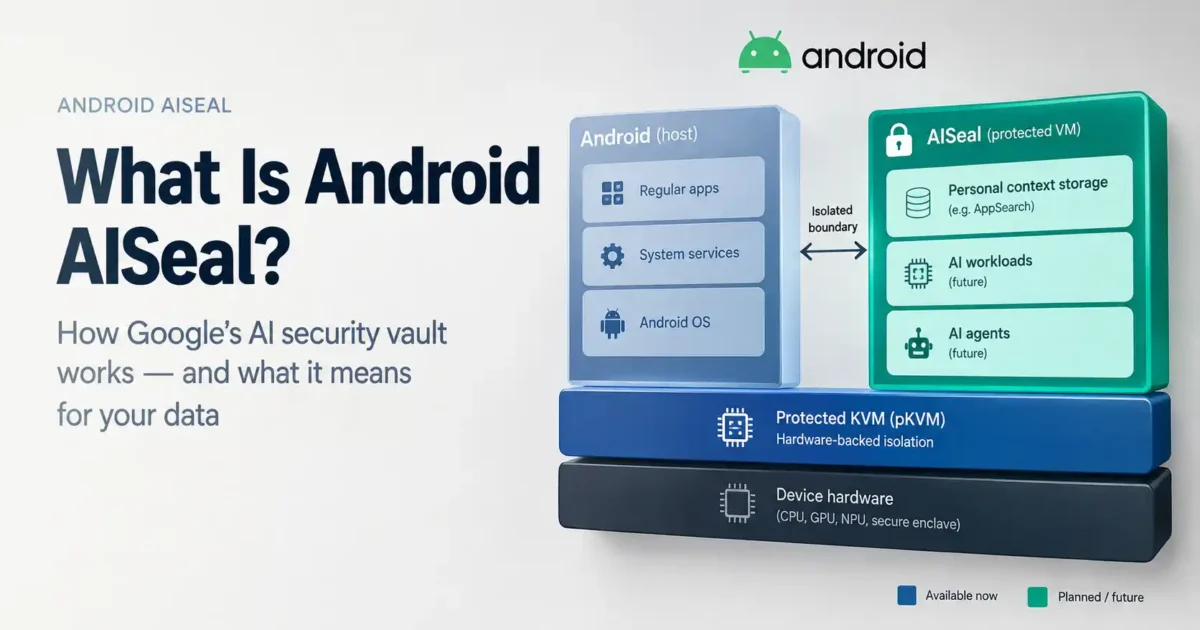

Android AISeal is Google’s hardware-backed security architecture for personalised on-device AI. Google says the foundational protected-storage capability is rolling out, while moving model execution and system-level AI agents into the protected virtual machine remains part of the roadmap. AISeal uses the Android Virtualization Framework and protected KVM to create the intended isolation boundary; it is not proof that every Android AI feature is private or offline by default.
Android already isolates apps with sandboxing and SELinux. AISeal addresses a newer problem. An assistant that can understand your files, messages, routines or other personal context needs more access than a simple chatbot. Google’s design is intended to keep that context inside a protected vault, separated from the normal host operating system.
What is Android AISeal?
AISeal is an enclave architecture for personalised on-device AI. Google describes a centrally managed secure vault built with protected virtual machines. Inside that vault, AISeal enforces multi-tenant access controls. This creates internal compartments so that one AI service (like a local search indexer) cannot arbitrarily access data stored by another AI component within the same enclave.
The important distinction is the boundary around the AI workload. AISeal is not a new chatbot and it does not replace Android’s existing security layers. It adds hardware-backed isolation for sensitive AI data and computation.
Why Android needs a secure AI vault
A basic assistant can answer a question without knowing much about you. A proactive assistant is different. It may need personal files, calendar details, app context, location or habits to be useful. That convenience creates a serious privacy question: where is the context stored, and which parts of the system can reach it?
Google says AISeal is designed to keep personal data cryptographically isolated even if the host operating system is compromised. That is an architectural goal, not an independent guarantee against every attack or every OEM implementation.
How Android AISeal works
- Android Virtualization Framework: provides the foundation for protected virtualised workloads.
- Protected KVM: helps isolate protected virtual machines from the host environment.
- Protected personal context: Google says the foundational encrypted-storage capability is rolling out; it is not universally available on every Android device.
- Planned on-device inference: Google says the roadmap includes moving model execution into the protected virtual machine; the announcement does not establish a universal current implementation.
- Planned AI-agent support: Google describes future assistants that combine private context with protected local processing under internal access controls.
In plain English, AISeal is meant to answer: what can this AI workload access while it is running? That matters more as assistants move from answering questions to taking actions.
What can AISeal protect?
Personal context and databases
Google describes protected personal-context storage as the foundational milestone currently rolling out. It says the vault can store and index context in encrypted local storage, with AppSearch mentioned as a reference implementation and support for other databases, including an OEM’s own store. That description should not be read as universal availability across Android devices.
Local inference
Google’s roadmap includes moving model execution into the protected virtual machine. That is a planned capability, not evidence that every compatible device currently runs foundation models inside the AISeal boundary.
To allow compute-heavy models to run inside a virtual machine without performance penalties, Google’s design roadmap includes Direct NPU Device Assignment giving the protected VM a private, hardware-enforced pipeline straight to the phone’s neural engine. If implemented for a particular device and feature, local processing could reduce the need to send context to a remote service; cloud processing can still remain part of an app’s design.
AI agents
An agent can plan and perform actions rather than only reply. That makes isolation, permission boundaries and activity visibility more important. Google presents moving system-level agents into the protected virtual machine as a future direction. Until a specific device and app implement that path, do not assume an existing Android agent is already running inside AISeal.
AISeal vs Android app sandboxing
Android’s app sandbox and SELinux controls stop applications from casually reading one another’s private data or performing unrestricted system operations. Those protections remain essential. They were not designed specifically for an AI layer that combines context from multiple sources.
AISeal is intended to add a protected environment for that combined AI workload. It works alongside Android sandboxing and SELinux; it does not replace them.
AISeal, Private Compute Core and pKVM: what is the difference?
- Private Compute Core: An existing OS-level protected Android environment for sensitive processing (such as Live Caption).
- Private AI Compute: Google’s broader approach to protecting AI-related data and processing.
- pKVM: the protected hypervisor technology used to isolate virtual machines from the host.
- AISeal: the newer enclave architecture Google is describing for personalised on-device AI.
These are related layers, not competing privacy switches. AISeal uses lower-level technologies such as AVF and pKVM to create a higher-level protected environment for AI services.
Is Android AISeal available on every phone?
No. AISeal depends on hardware virtualisation support, the Android build, silicon, OEM integration and the specific AI feature using it. A software update alone cannot guarantee identical support on every existing phone.
Google identifies MediaTek Dimensity 9600 Pro as supporting the pKVM-backed architecture and says Qualcomm Snapdragon chipsets will support it through AVF as the ecosystem expands. That does not establish support for every device using those processor families. The manufacturer must implement the complete security path.
Does AISeal make Gemini completely private?
No. AISeal can strengthen protection around supported on-device workloads, but it does not mean every Gemini request is processed locally or that cloud services disappear. The outcome depends on the feature, the data it needs, where processing occurs and the permissions you grant.
Before enabling an assistant, check its data controls, activity history, app permissions and cloud-processing settings. Our Gemini Android privacy guide covers the user-facing controls worth reviewing. For suspicious app behaviour, see our guide to checking whether an Android app is spying on you.
AISeal and local AI: what users should expect
AISeal points toward phones that can keep more personal context close to the device while future protected inference and agent features are developed. That could eventually help with private search, proactive reminders and on-device agents without sending every piece of context to a remote server. The current rollout should not be confused with that future end state.
Local models still consume memory, storage and battery. Hardware isolation does not fix model mistakes, bad permissions or misleading answers. For practical experiments, see our guides to running AI locally on Android and using a local LLM on an 8GB RAM laptop.
What AISeal cannot guarantee
- It cannot make every Android AI feature offline.
- It cannot stop an app from sending data to a cloud service that it is designed to use.
- It cannot prevent data leakage if a user grants an AI agent permission to export summary data to an external cloud API or unsecure app.
- It cannot fix a vulnerable OEM implementation or poorly configured assistant.
The same principle applies to AI agents on other platforms. A protected execution boundary helps limit access, but narrow permissions and clear policies still matter. Our Microsoft Execution Containers guide explains that wider containment problem.
Frequently asked questions about Android AISeal
What is Android AISeal in simple terms?
It is a hardware-backed protected environment for personal context, local inference and AI-agent workloads on compatible Android devices.
Does AISeal work on Android 17?
Google is introducing AISeal as part of Android’s on-device AI security direction, with the protected-storage foundation rolling out. Support for protected inference and system-level agents remains dependent on future implementation. Hardware, the Android build, OEM integration and the specific feature all matter; do not assume that every Android 17 phone has identical support.
Does AISeal stop Google from collecting data?
Not automatically. AISeal is designed to isolate supported local workloads. It does not override the data practices or cloud requirements of every app and service.
Is AISeal the same as Private Compute Core?
No. They are related parts of Google’s privacy architecture. AISeal is the newer protected-enclave approach for personalised on-device AI, while Private Compute Core is an existing protected Android processing environment.
Final verdict: AISeal is promising, not magic
Android AISeal addresses the right problem. Future assistants will need more personal context, and giving them broad access inside the ordinary operating system creates a difficult security trade-off. A hardware-isolated vault could keep sensitive AI data and, as Google’s roadmap develops, protected inference and agent execution behind a stronger boundary.
The caveat matters just as much as the promise. AISeal will matter only when phones, OEMs and apps implement it consistently. Treat it as a security foundation being built—not proof that every Android AI experience is private, local or safe by default. Read Google’s official AISeal announcement and the Android Virtualization Framework documentation for the technical background.

No comments yet. Be the first to share your thoughts!