
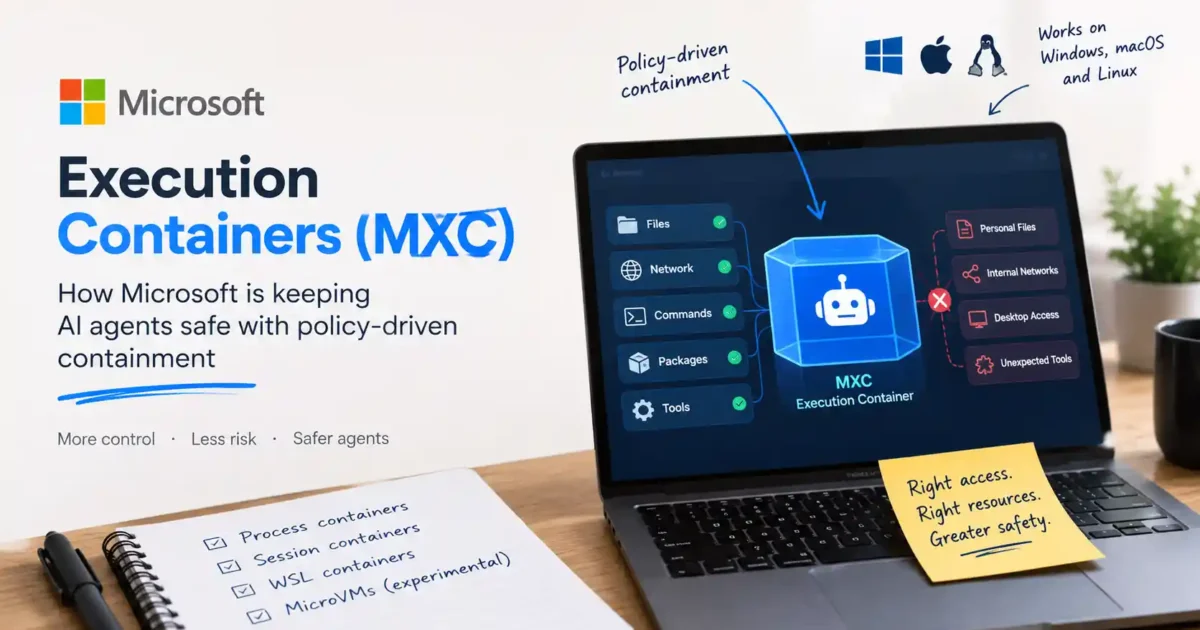

Microsoft Execution Containers (MXC) are a policy-driven way to contain AI agents while they run code, use tools, access files, or connect to networks. Microsoft says MXC is now generally available on Windows 11 and lets developers and administrators define which resources an agent may use. The policy is enforced while the workload runs, rather than relying only on an agent to behave itself.
That distinction matters because an AI agent is not just a chatbot waiting for a reply. A coding agent can read a repository, execute commands, write files, install packages, and make network requests. Giving it unrestricted access creates a larger failure zone if the model, a tool, a plugin, or generated code does something unintended. MXC is Microsoft’s answer to that containment problem—not a promise that every agent action is automatically safe.
What are Microsoft Execution Containers?
Microsoft Execution Containers are an execution layer for untrusted code and dynamically generated workloads, including AI-agent workloads. A developer or administrator declares the files, networks, and other resources a workload requires. MXC then chooses and applies an appropriate isolation boundary at runtime.
In simple terms, MXC is meant to answer a practical question: What is this agent allowed to touch while it is working? A coding agent may need access to one project directory and a package registry, but it should not automatically be able to read your personal documents, browse every internal network, or control the rest of the desktop. Microsoft’s model is to keep the needed capability while narrowing everything outside the declared boundary.
Why AI agents need containment
Traditional applications usually follow a predictable path: a user clicks a button, the program performs a defined operation, and the permissions are relatively stable. Agents are more fluid. They interpret instructions, choose tools, create intermediate steps, and may generate code that is executed during the task.
- A coding agent may run a shell command that was not obvious from the original prompt.
- A tool or plugin may request more access than the task actually needs.
- Generated code may contain a bug, destructive command, or unexpected network call.
- An agent with broad permissions can turn a small mistake into a much larger incident.
Containment does not make the model correct. It limits the damage that an incorrect or compromised workload can cause. That is the useful distinction: MXC is a boundary around agent execution, not an accuracy filter for the agent’s reasoning.
How Microsoft Execution Containers (MXC) work
Microsoft describes MXC as a policy-driven system. The workload declares the resources it needs, and the platform enforces the resulting policy at runtime. Depending on the workload and platform, the boundary can use different kinds of isolation.
Process containers
Process containers are intended for lightweight, responsive work such as model-generated code and tool execution. Microsoft says this mode works on Windows 11, macOS, and Linux, using the platform’s available process-sandboxing mechanisms. It is the closest fit for a quick agent task that needs controlled access without a full virtual machine.
Session containers
Session containers are designed for longer-running agents or automation that needs a stronger separation from the interactive user session. On Windows 11, Microsoft describes a separate account and session with boundaries around the desktop, clipboard, user input, and UI. That matters for an agent that operates for a while instead of running one short command.
WSL containers
WSL containers are aimed at Linux-first agent toolchains that depend on the Linux package and development ecosystem. They can be useful when an agent needs a Linux environment but should still operate within a defined boundary rather than receiving unrestricted access to the host system.
MicroVMs
MicroVMs provide a stronger, hardware-backed isolation option for higher-risk workloads. Microsoft labels this capability experimental in its announcement. That means readers should not treat it as the default or assume that every MXC integration supports it today.
Which operating systems support MXC?
Microsoft says MXC works across Windows, macOS, and Linux, but the depth of integration differs. Windows 11 receives the strongest platform integration, including process and session isolation, WSL-based options, virtual-machine boundaries, and Windows 365 support for agent workloads. Microsoft also says MXC is generally available on Windows 11.
This does not mean that every AI application automatically uses MXC. The agent, framework, or tool must integrate with it, and the relevant policies must be configured. A Windows 11 computer with the feature available is not the same thing as every locally installed chatbot running inside a protected container.
Which AI agents support MXC?
In its Windows announcement, Microsoft lists GitHub Copilot, OpenAI Codex, OpenClaw, Replit, LM Studio, NVIDIA OpenShell, and Unsloth AI among agents that already support MXC. It also lists several projects—including Anthropic Claude Code, Perplexity, Raycast, Manus, and others—as expected to add support.
These lists are time-sensitive. Support can depend on a particular app version, operating system, integration path, or preview status. Check the agent’s own documentation before assuming that a specific command or workflow is contained.
MXC and Copilot: what changes?
Microsoft is connecting MXC with a broader Windows strategy built around local and cloud AI. Copilot may use local context, take actions with permission, and route some work to models running on the PC. As those capabilities become more agent-like, a containment layer becomes more important than it would be for a simple question-and-answer assistant.
For developers, the practical example is straightforward: an agent can be given access to the repository it needs, the development tools required for the task, and specific network destinations—without being given the keys to everything else on the computer. That is a better security posture than relying on a broad “allow” prompt every time the agent wants to do something. If you are comparing this with local model setups, our Open WebUI on Windows guide covers the application layer; MXC addresses the boundary around the workload that application launches.
Is MXC the same as a sandbox or virtual machine?
Not exactly. “Sandbox” describes the general idea of restricting a workload. MXC is Microsoft’s policy-driven execution framework that can use different isolation backends, including process boundaries, separate sessions, WSL environments, and—where supported—microvirtual machines. A virtual machine is one possible isolation technique; MXC is the policy and execution model that can select among several boundaries.
What MXC does not guarantee
MXC should not be marketed as a complete security solution on its own. It does not guarantee that an agent will produce correct code, avoid social-engineering mistakes, protect secrets that an administrator deliberately exposes, or make a poorly written policy safe. For a broader account-security baseline, see our advanced password security guide and data-breach checking guide.
- Policies still need to be scoped carefully.
- Credentials and tokens should not be placed inside an agent’s environment unnecessarily.
- Network access should be limited to destinations the task actually requires.
- Organizations may need additional identity, logging, monitoring, and governance tools.
- Availability and behavior can vary by device, operating system, integration, and rollout stage.
Who should care about Microsoft Execution Containers?
MXC is most relevant to developers building or using coding agents, companies allowing autonomous tools to work with internal files, and IT teams that need to govern agent activity across managed devices. If you use an AI desktop tool that can read local files, our guide to local file access in Claude Desktop provides useful context for thinking about permissions before enabling an agent. A casual user asking Copilot to rewrite a paragraph may never notice the container layer. Someone asking an agent to modify a repository, execute scripts, or work with business data should care very much about the boundary around that task.
Microsoft Execution Containers: frequently asked questions
Are Microsoft Execution Containers available now?
Microsoft says MXC is generally available on Windows 11. Individual features and integrations can still vary by operating system, device, app version, market, and rollout.
Does MXC stop an AI agent from accessing all files?
No. It is designed to enforce the access policy defined for the workload. If a user or administrator grants access to a file or directory, the agent may be able to use that access. Good containment starts with a narrow policy.
Can MXC protect a personal Windows PC?
Microsoft says safeguards are part of the agent experience for individuals using supported AI tools on a personal PC. In practice, the protection depends on whether the application integrates with MXC and how its permissions are configured.
Is MXC a replacement for antivirus software?
No. MXC addresses agent and workload containment. It does not replace endpoint protection, software updates, identity controls, backups, secure credential handling, or normal security monitoring.
The verdict
Microsoft Execution Containers are one of the more practical security responses to the rise of autonomous AI tools. Instead of asking users to trust an agent with broad access and hope for the best, MXC gives developers and administrators a way to define a smaller operating boundary. Its value will depend less on the name of the container and more on the quality of the policies, integrations, identity controls, and monitoring around it.
For the technical details, see Microsoft’s MXC announcement, the Windows hybrid-intelligence overview, and the official MXC repository. For related local-AI reading, see our guide to running a local LLM on an 8GB RAM laptop.

No comments yet. Be the first to share your thoughts!