

If you opened Instagram this week and felt a little uneasy, you weren’t imagining it. Meta quietly opted every public account into an AI tool called Muse Image, let strangers reference your photos by typing your handle, and didn’t tell you. That’s why so many people are searching for an Instagram AI opt out right now. Three days later, under pressure from SAG-AFTRA and CAA, Meta pulled the feature. Here’s what actually happened, what’s still true today, and exactly how to lock down your account either way.
What Is Meta Muse Image and Why It Matters Right Now
Muse Image launched on July 7, 2026, as Meta’s first image-generation model, built by Meta Superintelligence Labs. The headline feature the one that caused all the trouble let anyone open the Meta AI app and @-mention a public Instagram account to pull that person’s photos in as a visual reference for a new AI image. No permission request. No notification. Just a tag and a prompt.
That’s the part that broke trust. Instagram has quietly rolled out AI features before. This one was different because it turned every public profile into raw material for a stranger’s prompt, by default, silently.
Instagram AI Opt Out Status: Current Update After Meta’s Backlash (July 2026)
Here’s the update most guides haven’t caught up on yet: Meta removed the @-mention feature on Friday, July 10, 2026. In a statement, the company said, “We’ve heard the feedback that this feature missed the mark, so it’s no longer available.”
That reversal came fast. CAA representing clients like Meryl Streep and Tom Hanks publicly demanded Meta flip the default to opt-in. SAG-AFTRA told members and “all Instagram users” to opt out immediately, calling the default “an utter miscalculation of public sentiment.” Within days, Meta backed down.
Does that mean you’re safe now and can skip the rest of this article? Not quite. Meta hasn’t said whether a modified version is coming back, and the Instagram AI opt out setting itself hasn’t gone anywhere — it still exists, still matters, and still governs how your content can be used elsewhere in Meta’s AI tools. Treat this as paused, not resolved.
Who Is Affected: Public, Private, and Teen Accounts
| Account type | Affected by Muse Image? | What Meta says |
|---|---|---|
| Public, adult | Yes | Opted in by default; opt-out toggle available |
| Private | No | Private uploads can’t be referenced by the tool |
| Teen (under 18) | No | Automatically excluded, can’t be tagged, can’t tag others |
Rollout scope note: the @-mention feature launched US-first via Instagram Stories, with WhatsApp available in a limited set of countries. If you’re outside the US and don’t see any of this yet, that’s expected it likely hasn’t reached your region on this timeline, not necessarily that you’re excluded by policy. Separately, EU regulators are watching this closely: under the EU AI Act’s Article 50 labeling rules taking effect August 2, 2026, AI-generated content shared in the EU must carry a visible label, and Meta hasn’t yet confirmed whether its invisible Content Seal watermark will be adapted to meet that standard.
Creators and public figures took the biggest hit, since their entire appeal visibility became the exact thing exposing them. If you run a public account for business or audience growth, going fully private isn’t realistic, which is exactly why the opt-out toggle matters more for you than for anyone else.
Parents: Meta says teen accounts are excluded automatically. I’d still check. Policies like this get adjusted quietly, and “automatically excluded” is a claim worth verifying on your kid’s actual account rather than trusting on faith.
Step-by-Step: How to Do an Instagram AI Opt Out
The @-mention feature is currently pulled, but this setting is still worth locking down now it covers more than just Muse Image, and you don’t want to be caught flat if a revised version ships quietly.
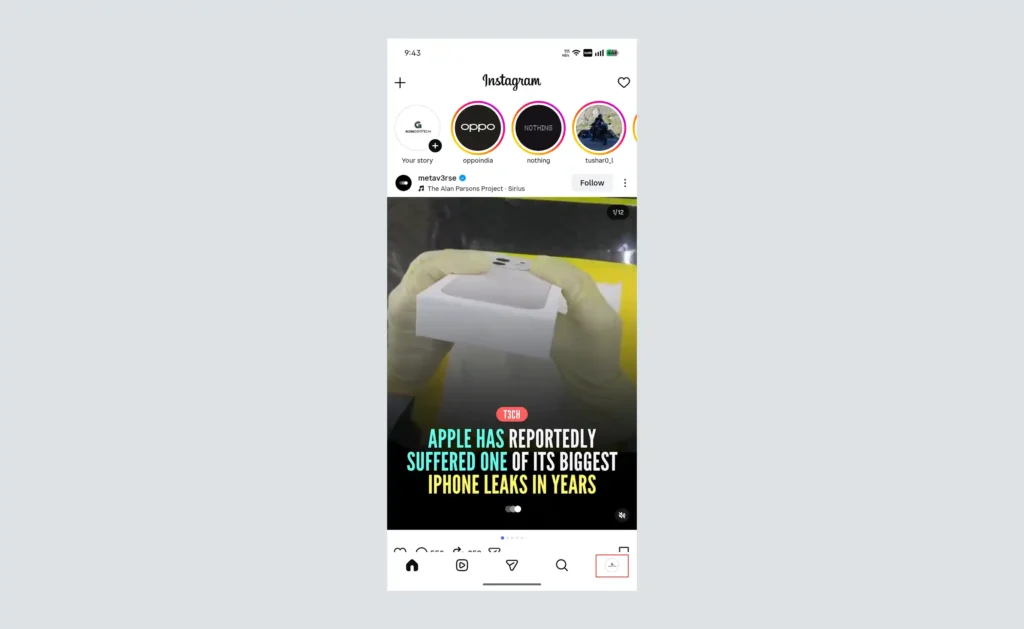
Step 1: Open your profile.
Launch Instagram and tap your profile icon.
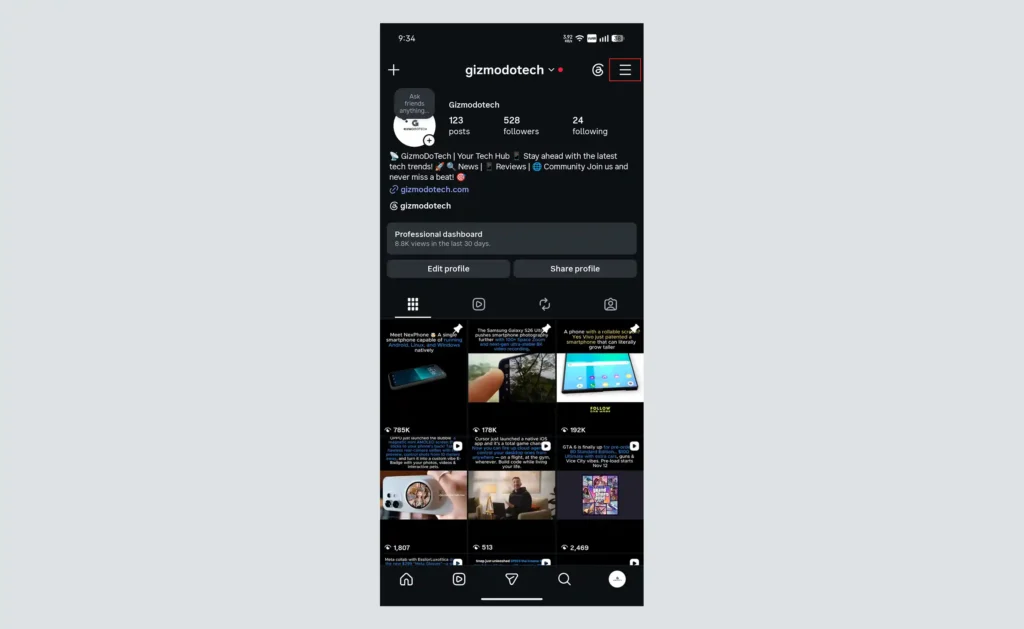
Step 2: Open the menu.
Tap the three-line icon in the top right corner.
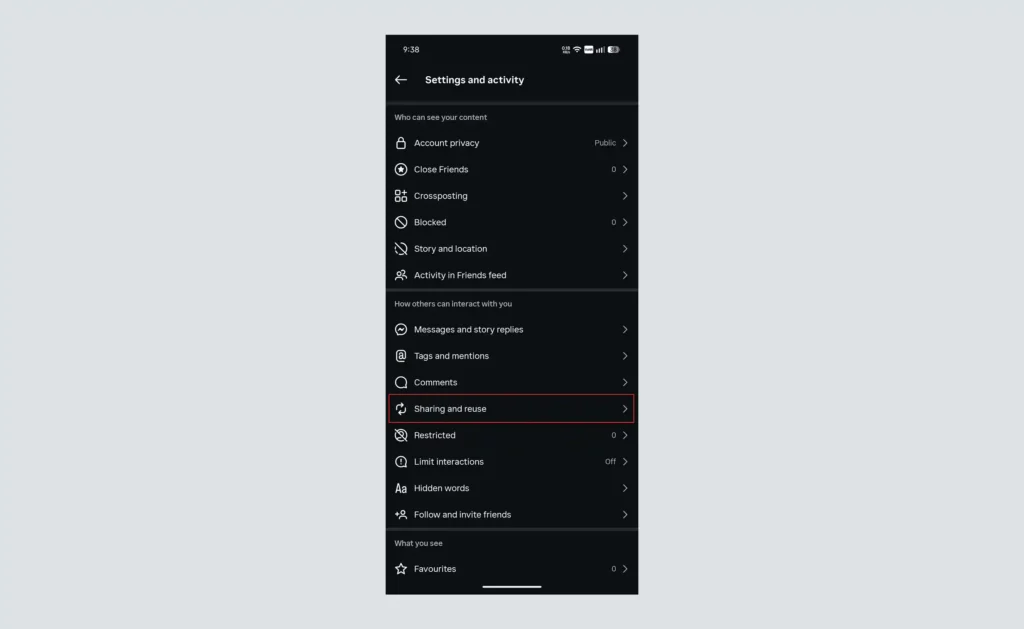
Step 3: Go to Settings and activity, then find Sharing and reuse
Tap it from the menu, then scroll down to the “How others can interact with you” section and tap Sharing and reuse to open it.
Step 4: Locate the AI reuse setting.
Look for “Allow people to reuse your content on Instagram and with AI features at Meta
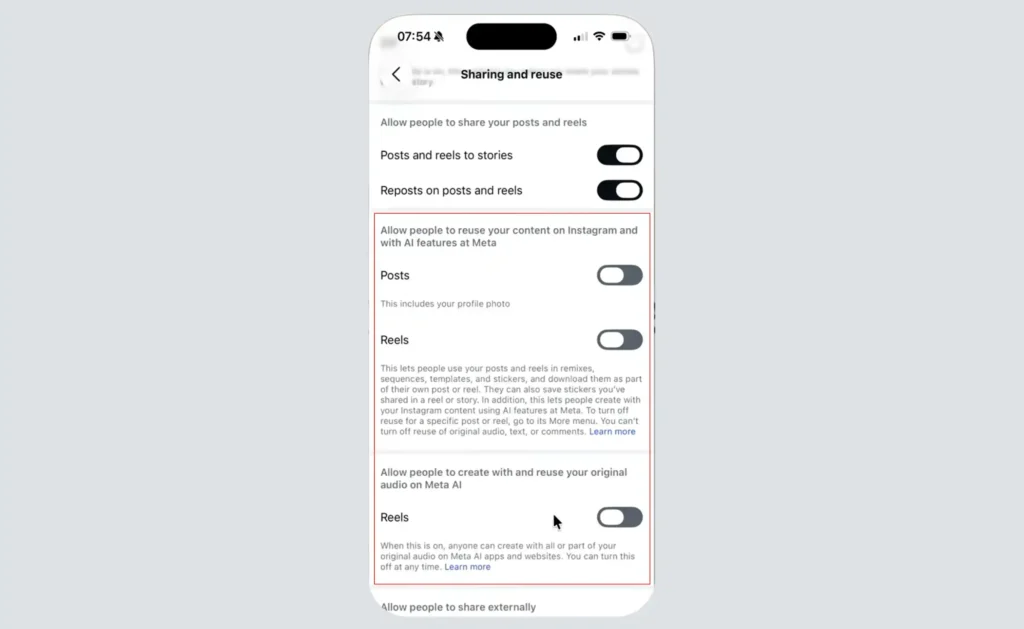
Step 5: Turn off each toggle
Switch off Posts, then Reels. If a third toggle for original audio appears, switch that off too.
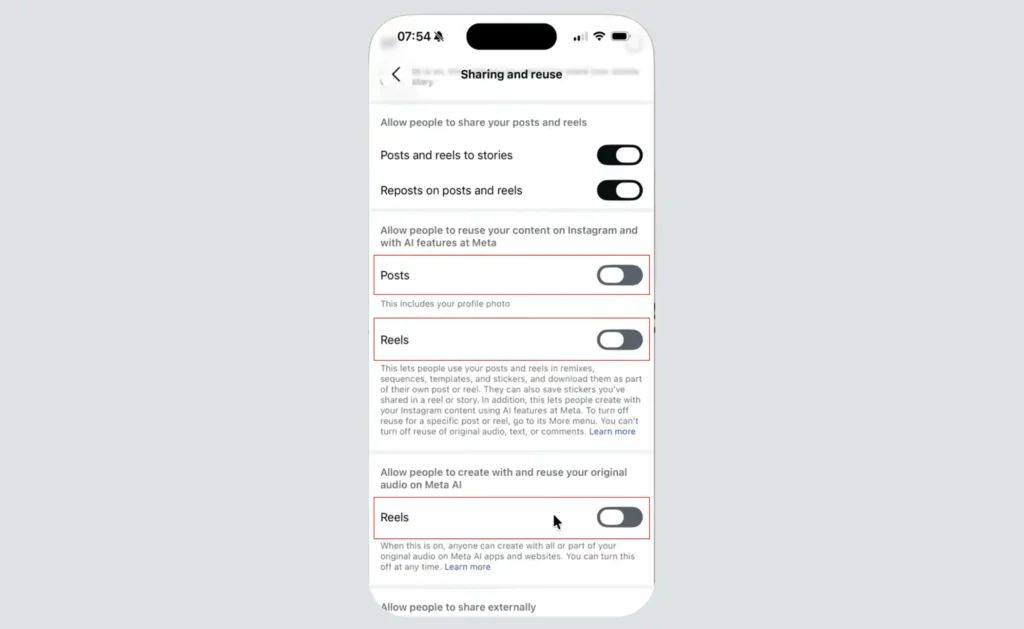
⚠️ Toggle not showing up? This setting rolled out in stages, starting in the US. Update the app first. If it’s still missing after that, Meta likely hasn’t pushed it to your region or account tier yet — this has been widely reported and isn’t a sign something’s wrong with your account specifically.
⚠️ Honest limitation: turning this off does not undo anything already generated. If someone referenced your account before you flipped the switch, that image still exists. Opting out is forward-looking only — it doesn’t reach into the past.
Does Opting Out Stop Meta From Training AI on My Photos Too?
This is where most explainers get sloppy, so let’s be precise. The Sharing and Reuse toggle controls whether people can reference your public content inside Meta’s AI creative tools, like Muse Image. It is a separate question from whether Meta uses your public posts to train its underlying AI models generally.
Meta hasn’t published a single, crystal-clear answer distinguishing the two, and that ambiguity is itself worth knowing about. If broader AI training opt-outs matter to you, check Meta’s Privacy Center directly don’t assume this one toggle covers everything.
Hidden Risks and Dark Patterns
Calling this “opt-out” undersells the design choice. Defaulting millions of public accounts into a feature, without a notification, buried three menus deep that’s a dark pattern, full stop. Security researchers flagged a real downstream risk too: public photos are already scraped for deepfake-driven identity fraud, and a built-in, easy reference tool lowers the bar for anyone trying to impersonate you convincingly.
You also won’t be notified if someone tags your account, opted out or not. There’s no dashboard showing you what’s been made. That lack of visibility is arguably the bigger long-term issue here, and it wasn’t addressed by Friday’s rollback.
Best Protection Tips (Beyond Just Opting Out)
- Private beats toggle, if you can afford it. A private account blocks reference entirely; the toggle just requests exclusion.
- Turn on two-factor authentication. Unrelated to Muse specifically, but it closes a bigger door.
- Check teen accounts yourself. Don’t rely solely on Meta’s automatic exclusion claim.
- Revisit this setting monthly. Toggles can reset after app updates — it’s happened before with other Meta privacy controls.
- Bookmark Meta’s newsroom page. This story isn’t over.
Key Takeaways
Meta pulled the @-mention feature on July 10, but the opt-out setting still exists and still matters. Public accounts remain more exposed than private ones. Opting out protects future use only — it can’t erase what’s already been made. And “automatically excluded” for teens is worth double-checking, not just trusting.
Conclusion
Whether or not Muse Image comes back in a new form, the underlying lesson holds: check your Sharing and Reuse settings now, while it’s front of mind, instead of waiting for the next quiet rollout to force your hand.

No comments yet. Be the first to share your thoughts!